Architecture
FanRows connects body tracking, movement signals, sound material and real-time audio processing to create responsive sound environments in the browser.
The technical structure follows the experience itself: a person moves, the system derives changing signals from that movement, those signals influence sound and visuals, and the result is heard immediately. Several relationships can act at the same time, allowing a sound space to respond to posture, movement, velocity, stillness and combinations of these qualities rather than to isolated commands.
Body movement shaping a responsive sound environment.
From Body to Sound
The main input to FanRows is currently a webcam. MediaPipe estimates the position of the body in real time, and FanRows derives signals from this information rather than working directly with the video image.
These signals can describe relationships such as shoulder or elbow angles, torso position, direction, body velocity, movement energy or stillness. A signal is then mapped to one or more properties of the sound environment. It may influence the level of a layer, change filtering or texture, alter an effect, or affect the balance between several sounds.
Several mappings can remain active simultaneously. Raising an arm may bring one layer forward while the changing elbow angle alters its character, and body movement may influence another part of the sound field at the same time. The result depends on the changing configuration of the body rather than on one gesture producing one event.
The basic path is:
Body movement → motion tracking → movement signals → mappings → audio and visual response
FanRows Studio
Studio is the environment in which these relationships are assembled into a sound space.
It brings sound material, movement signals, mappings, scenes and responses together in one place so that a room can be designed and immediately experienced.
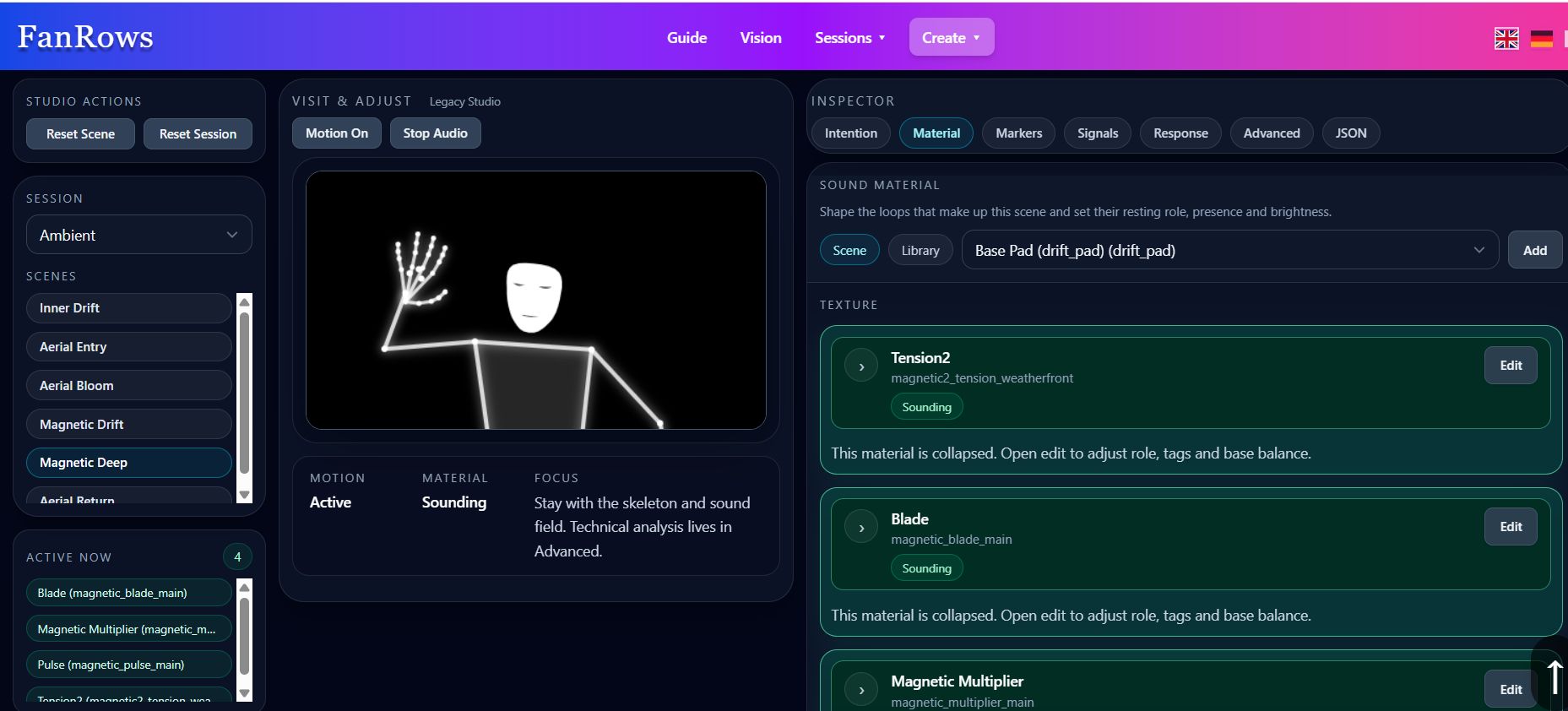
FanRows Studio connects sound material, motion signals, mappings, signal presets, response recipes and runtime preview into one room-building environment.
The distinction between creation and experience is deliberately simple:
Studio shapes the room.
Runtime plays the room.
A creator can change mappings, sound material and scene behaviour in Studio, then enter the same configuration through Runtime and experience it as a continuous body–sound environment.
Architecture Overview
The central object in FanRows is the sound space itself. A session contains the material and relationships needed to define that space, while scenes allow its character and behaviour to change over time.
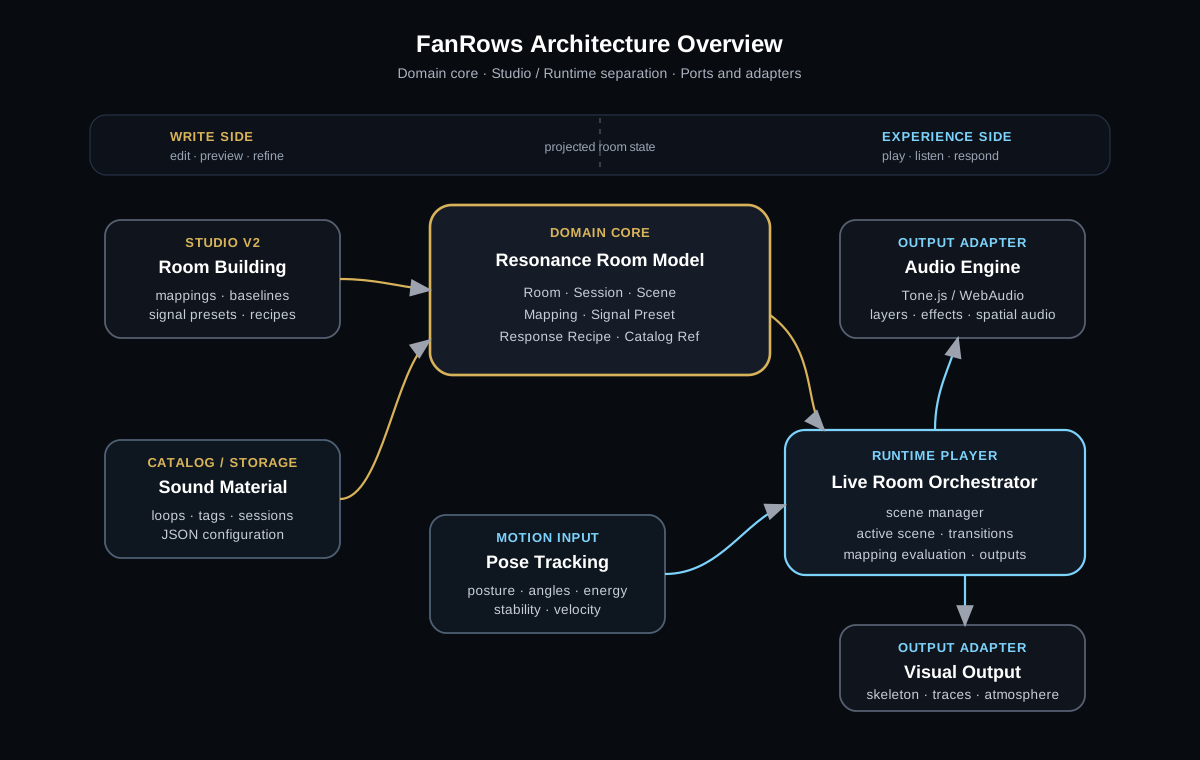
FanRows separates the design of a sound space from its live execution while keeping both based on the same room configuration.
Studio works with the editable definition of the space. Runtime takes that definition and turns it into live motion tracking, audio processing and visual response.
This separation makes it possible to develop the creator environment without making the runtime experience unnecessarily complex. Someone entering a FanRows session does not need to see the structures used to build it.
The Room Model
A FanRows sound space is assembled from a small number of related elements.
Sound material provides the audible substance: drones, textures, loops, noise, atmospheric layers or other recordings. Movement signals describe changing qualities of the body. Mappings connect those signals to sound responses, while scenes organize different conditions within the same session.
These parts are intentionally independent enough to be recombined. The same movement signal can influence different sounds in different rooms, and the same piece of sound material can behave differently depending on its mappings.
This makes a FanRows room more than a fixed collection of audio tracks. Its behaviour is defined by relationships between sound, body and time.
Movement Signals and Sound Responses
Studio provides reusable structures for working with movement without having to rebuild every relationship from the lowest technical level.
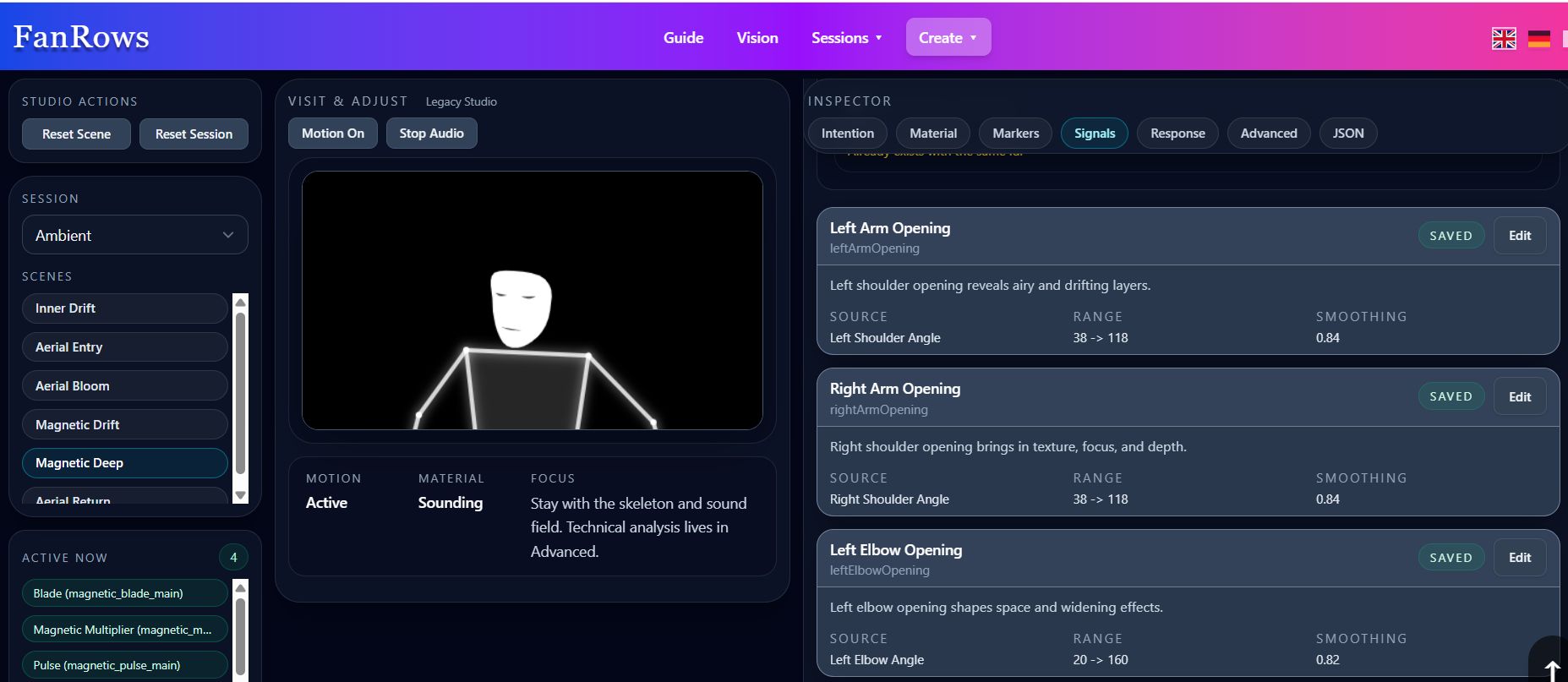
Signal Presets describe motion inputs such as movement energy, arm openness, stillness, angular change or directional motion.
A signal can represent a directly measured relationship such as an elbow angle, or a more general movement quality derived from several measurements. Its useful range can then be mapped to the part of a sound response that should become perceptible.
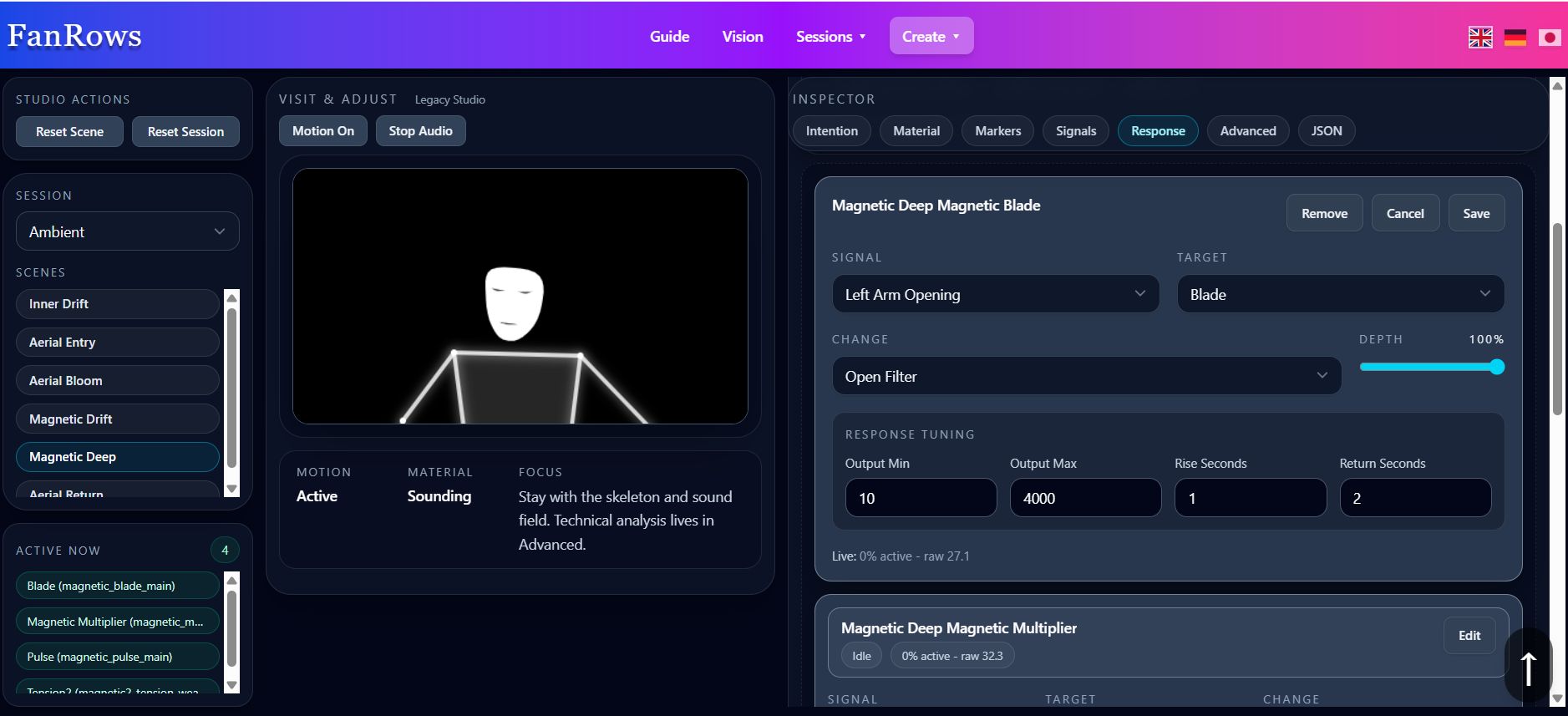
Response Recipes describe sonic behaviours such as gentle opening, spatial widening, rhythmic density, fragile texture, slow brightness or atmospheric depth.
The purpose of these structures is not to hide the mapping itself. They make recurring relationships easier to describe, reuse and refine. A creator can begin with a meaningful movement or sonic behaviour and then adjust the exact relationship while experiencing the room.
Multiple ranges can also be meaningful within the same signal. Different shoulder-angle regions, for example, can reveal different layers or affect several sound properties at once. This allows the body to move through distinct sonic areas without requiring a vocabulary of named gestures.
Scenes and Transitions
Scenes allow a FanRows session to change without becoming a sequence of separate tracks.
A scene can introduce different sound material, mappings or degrees of responsiveness while remaining part of the same larger sound world. One scene may provide relatively direct relationships between movement and sound, while another can leave more space for overlapping mappings, slow changes or less deliberate exploration.
Transitions are therefore an important architectural part of the experience. When sound layers and parameters change gradually, the participant can move from one condition into another without leaving the body–sound interaction.
The aim is not simply to switch presets. A transition can feel like moving into another region of the same space.
Sound Catalog
FanRows uses a catalog to organize the sound material available to FanRows Studio.
Loops and sound sources can carry information about their role, source, type, musical characteristics and manually refined tags.
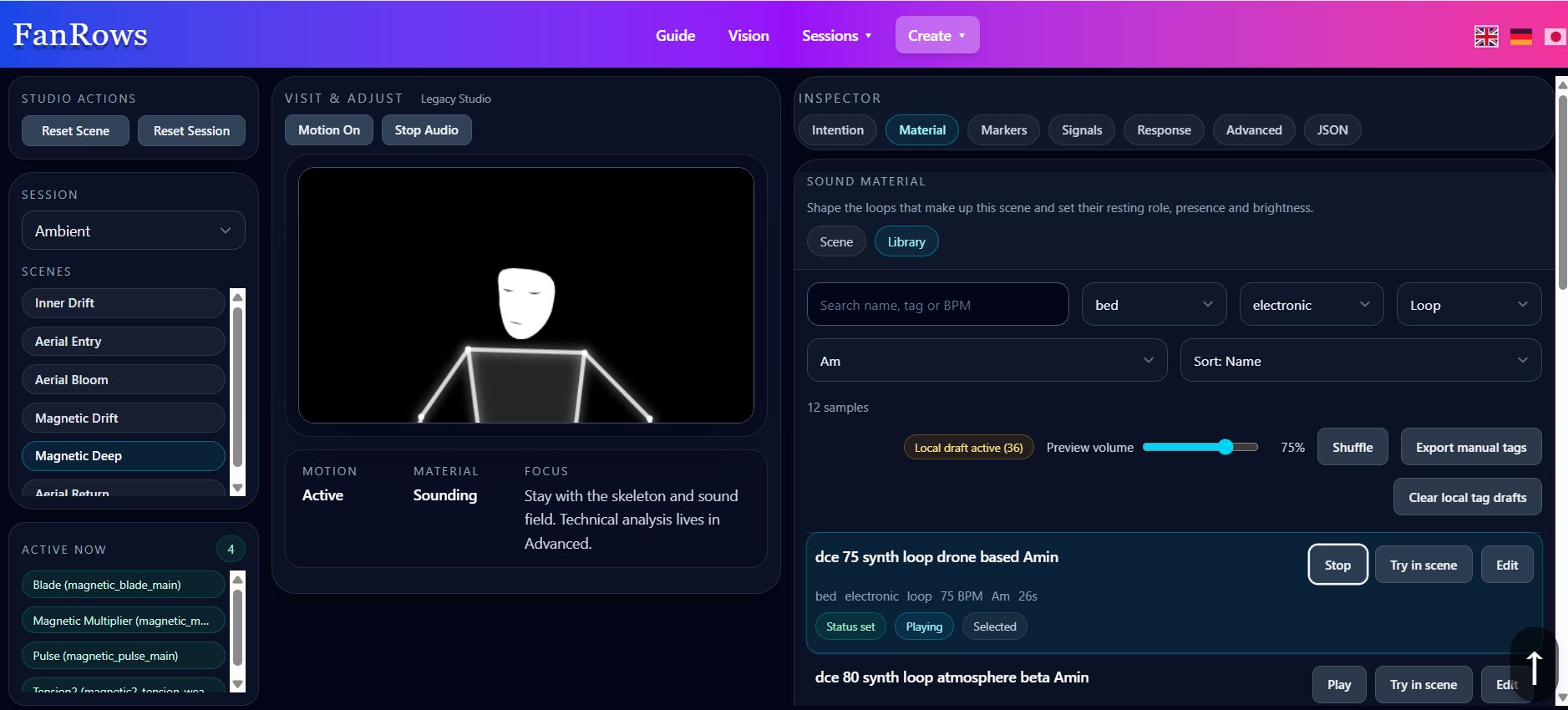
The catalog turns sound files into searchable material for building sound spaces.
The catalog helps distinguish material that may serve very different functions inside a room. A low drone, a fragile texture, filtered noise, a pulse or an airy background layer may all occupy different roles even when they come from the same production environment.
This becomes increasingly useful as the collection grows, because sound material can be selected according to how it may behave inside an interactive space rather than only by filename or genre.
Visuals
Visuals provide another layer of feedback and atmosphere.
They can make movement visible, show that the environment is responding and reinforce the character of a particular sound space. They are not required to carry the entire interaction, however; the body–sound relationship remains meaningful without them.
Visuals support the experience without replacing the relationship between body and sound.
The visual system can therefore remain relatively restrained in one room and become more expressive in another. It is treated as part of the environment rather than as a separate animation or avatar system.
Local-First Execution
The core FanRows experience currently runs locally in the browser.
Webcam processing, movement analysis and audio rendering happen on the participant's device. Video frames and pose data do not need to be sent to a remote service in order for the interaction to work.
This keeps the feedback loop fast, reduces the technical barrier to entering a session and supports FanRows' privacy model: the camera is used to derive movement signals, not to identify or classify the person in front of it.
Browser technologies such as MediaPipe, Web Audio and Tone.js also mean that the basic experience does not require a dedicated motion-capture installation or specialized audio hardware.
A System for Embodied Sound Spaces
FanRows architecture is built around the relationship between a moving body and a changing sound environment.
Motion tracking provides information about the body. Signals turn that information into usable movement qualities. Mappings connect those qualities with sound and visual behaviour. Scenes allow the character of the environment to develop over time, while Studio provides the tools for creators to assemble and refine those relationships.
The architecture is intended to remain open enough for new movement signals, sound responses, visual systems and other forms of input to be added without changing the basic idea of FanRows.
What matters is not the number of technical components, but whether they together create a sound space that remains responsive, coherent and worth exploring.
For the creator-facing perspective, see Create Sound Spaces →.
For the research questions behind the system, see Research →.
FanRows — Body, movement and sound connected in real time.