Architecture
FanRows connects body tracking, movement signals, sound material and real-time audio processing to create responsive sound environments in the browser.
The technical structure follows the experience itself: a person moves, the system derives changing signals from that movement, those signals influence sound and visuals, and the result is heard immediately. Several relationships can act at the same time, allowing a sound space to respond to posture, movement, velocity, stillness and combinations of these qualities rather than to isolated commands.
Body movement shaping a responsive sound environment.
From Body to Sound
The main input to FanRows is currently a webcam. MediaPipe estimates the position of the body in real time, and FanRows derives signals from this information rather than working directly with the video image.
These signals can describe shoulder or elbow angles, torso position, direction, body velocity, movement energy or stillness. In Body Studio, a creator connects a signal to a particular response: bringing a sound layer forward, changing its filtering or position, shaping an effect, or influencing a supported visual element.
Several connections can remain active simultaneously. Raising an arm may bring one layer forward while the changing elbow angle alters its character, and overall body motion may influence another part of the sound field. The result depends on the changing configuration of the body rather than on one gesture producing one event.
The basic path is:
Body movement → motion tracking → movement signals → connections → sound and visual responses
FanRows Studio
FanRows Body Studio is the creator environment in which these relationships are assembled into a sound space.
Within a scene, creators can work with sound material, movement signals and their connections while keeping the live preview in view. A connection makes the relationship explicit: which movement influences which sound or visual behaviour, and how strongly and quickly it responds.
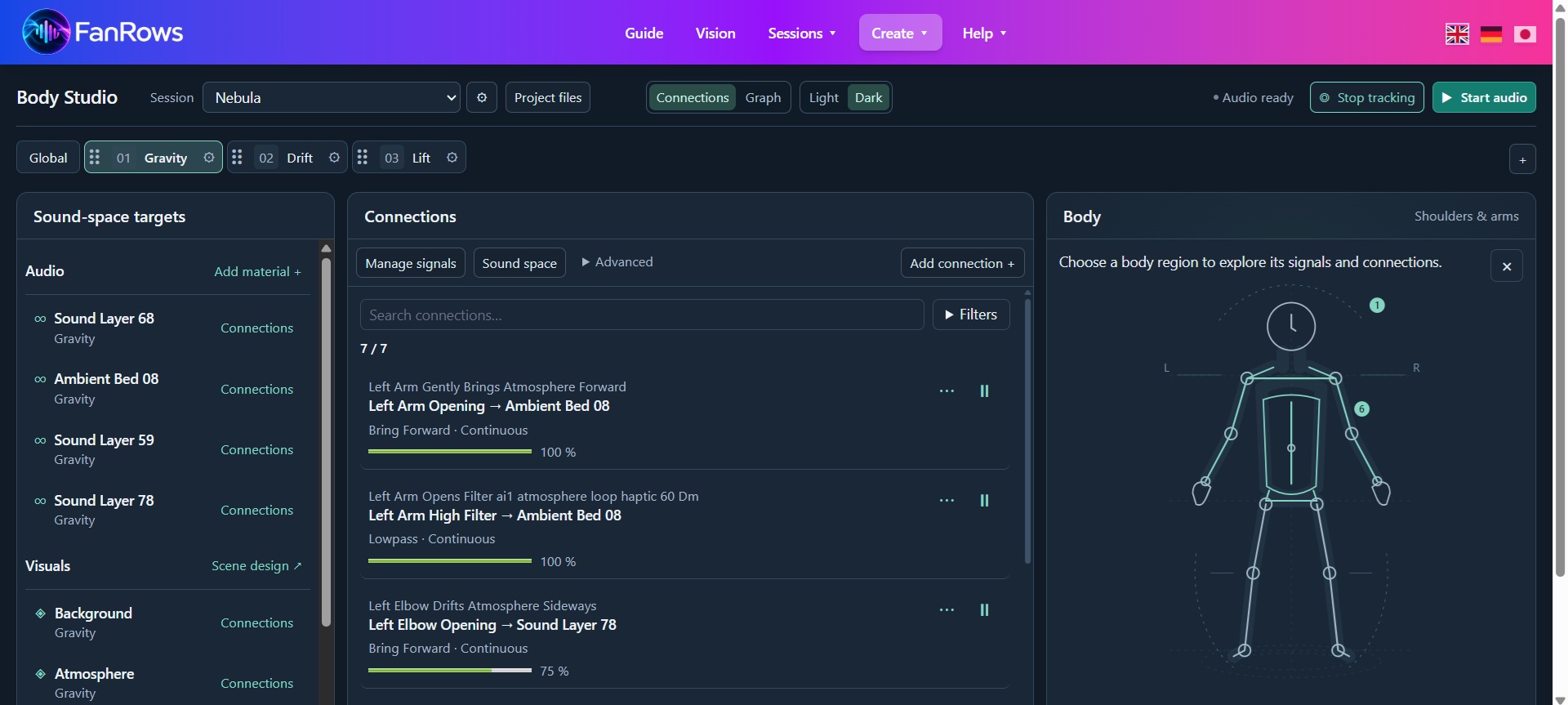 Body Studio brings sound targets, movement connections, scene navigation and live preview into one workspace.
The distinction between creation and experience is deliberately simple:
Studio shapes the room.
Runtime plays the room.
A creator can refine connections, sound material and scene behaviour in Studio. The same session configuration can then be experienced through the runtime as a continuous body–sound environment.
Architecture Overview
The central object in FanRows is the sound space itself. A session contains the material and relationships needed to define that space, while scenes allow its character and behaviour to change over time.
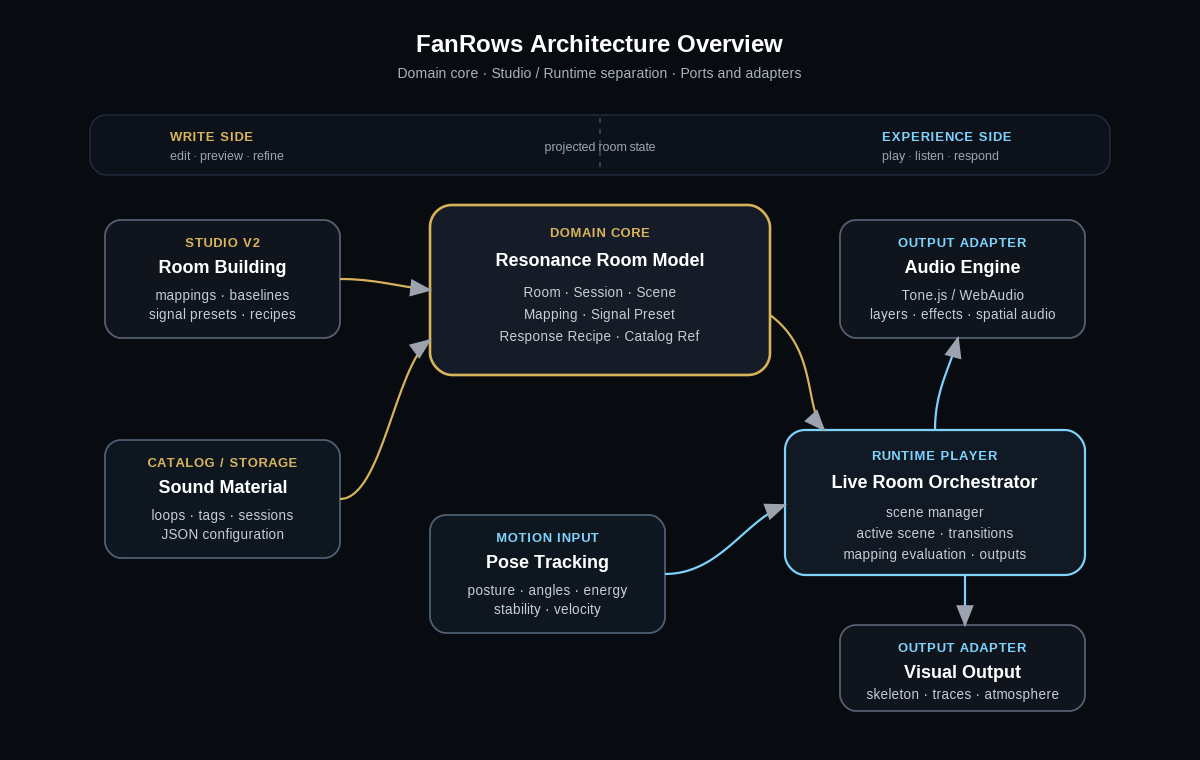 FanRows separates the design of a sound space from its live execution while keeping both based on the same room configuration.
Studio works with the editable definition of the space. Runtime takes that definition and turns it into live motion tracking, audio processing and visual response.
This separation makes it possible to develop the creator environment without making the runtime experience unnecessarily complex. Someone entering a FanRows session does not need to see the structures used to build it.
The Room Model
A FanRows sound space is assembled from a small number of related elements.
Sound material provides the audible substance: drones, textures, loops, noise, atmospheric layers or other recordings. Movement signals describe changing qualities of the body. Connections link those signals to sound or supported visual responses; beneath the interface, mappings determine how input values affect the selected properties. Scenes organize different conditions within the same session.
These parts are intentionally independent enough to be recombined. The same movement signal can influence different sounds in different spaces, and the same piece of sound material can behave differently depending on its connections.
This makes a FanRows room more than a fixed collection of audio tracks. Its behaviour is defined by relationships between sound, body and time.
Movement Signals and Connections
Body Studio makes the relationships between movement, sound and visuals visible and editable. Creators can shape how different qualities of movement influence the environment, allowing several connections to work together within a scene.
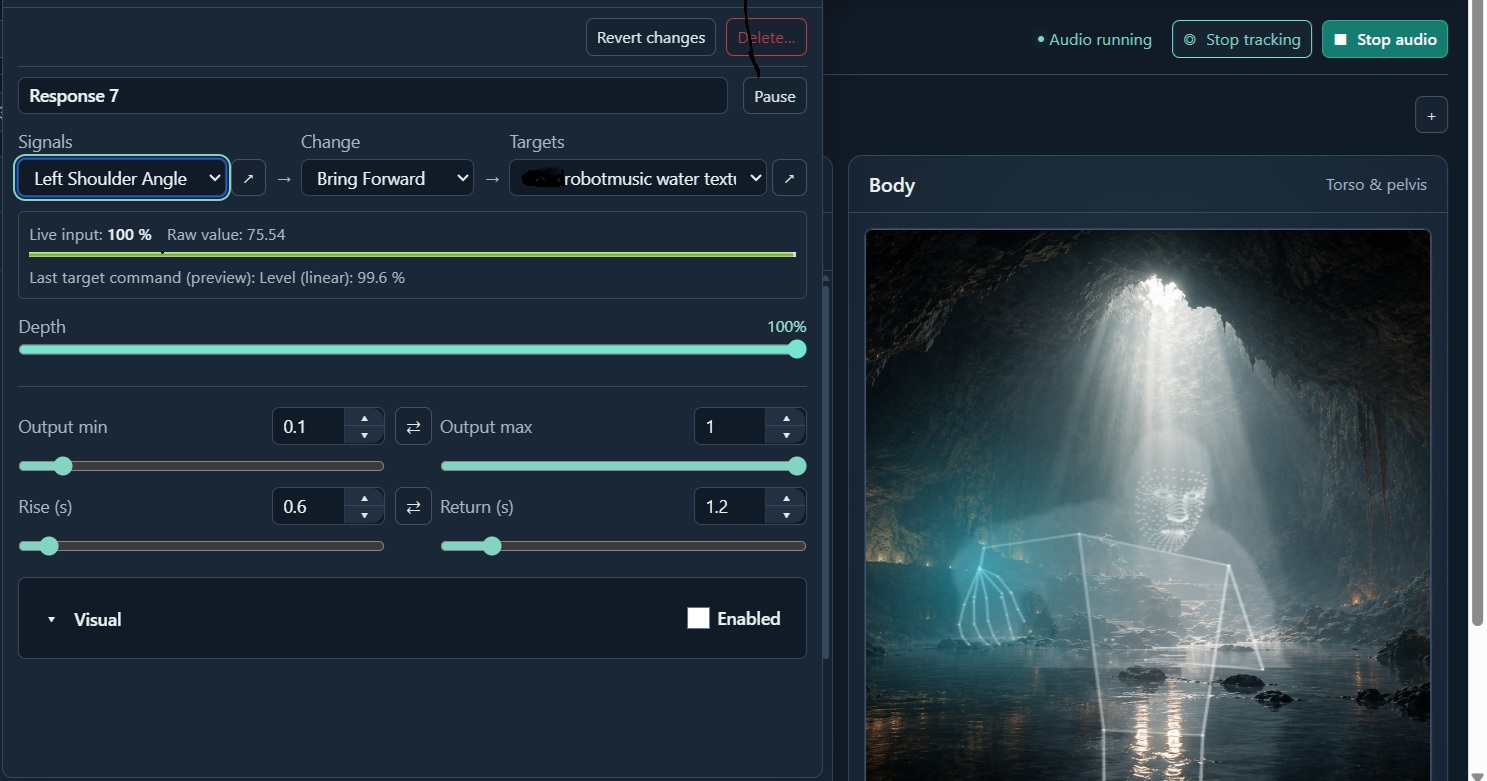 Connections define how bodily movement shapes sound and visual responses.
The Signal Library provides individual movement signals and reusable signal bundles, including arm elevation, elbow opening, shoulder tilt and movement activity.
Connection Templates (Response Recipes) offer starting points for meaningful interactions, such as opening a sound's filter by raising an arm or bringing a sound layer forward through body movement.
Creators can refine these relationships while experiencing their effects in the live preview. A single movement signal can influence several sound properties, enabling rich and interconnected responses.
Scenes and Transitions
Scenes allow a FanRows session to change without becoming a sequence of separate tracks.
A scene can introduce different sound material, connections or degrees of responsiveness while remaining part of the same larger sound world. One scene may provide relatively direct relationships between movement and sound, while another can leave more space for overlapping responses, slow changes or less deliberate exploration.
Transitions are therefore an important architectural part of the experience. When sound layers and parameters change gradually, the participant can move from one condition into another without leaving the body–sound interaction.
The aim is not simply to switch presets. A transition can feel like moving into another region of the same space.
Sound Catalog
FanRows uses a catalog to organize the sound material available to FanRows Studio.
Loops and sound sources can carry information about their role, source, type, musical characteristics and manually refined tags.
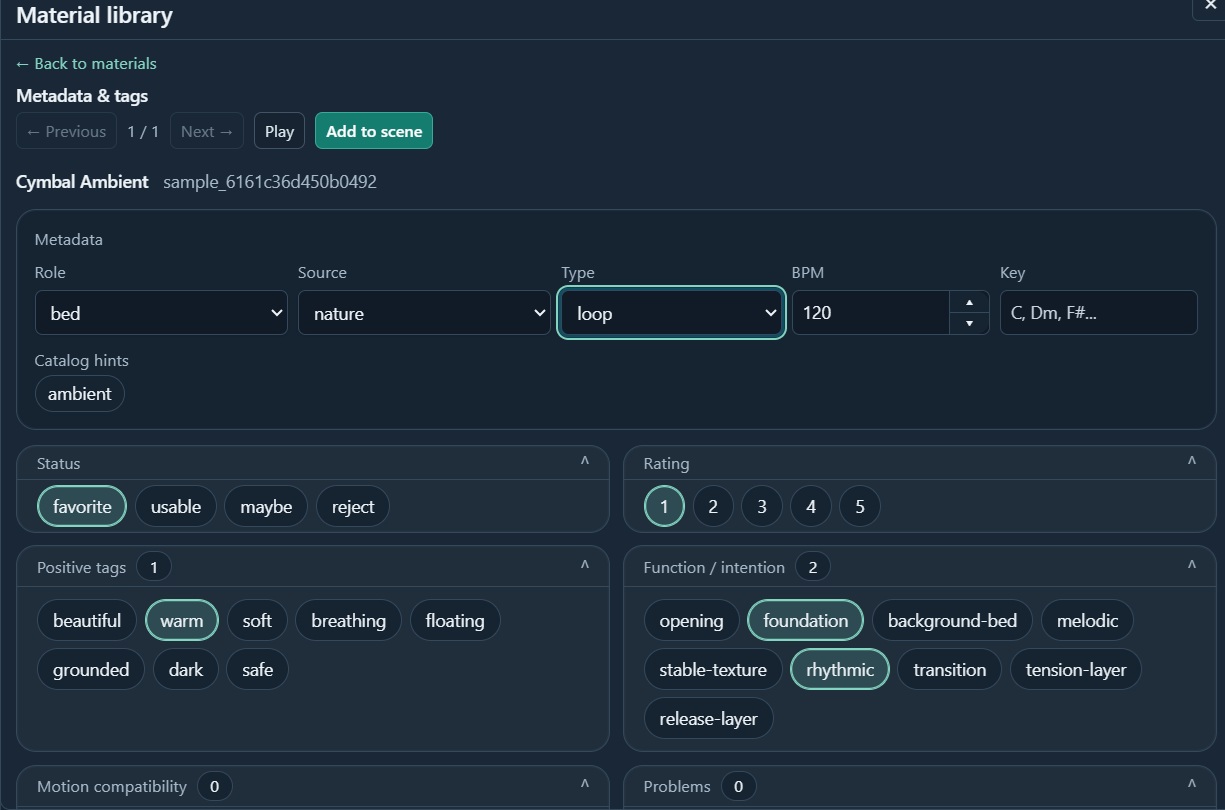 The catalog turns sound files into searchable material for building sound spaces.
The catalog helps distinguish material that may serve very different functions inside a room. A low drone, a fragile texture, filtered noise, a pulse or an airy background layer may all occupy different roles even when they come from the same production environment.
This becomes increasingly useful as the collection grows, because sound material can be selected according to how it may behave inside an interactive space rather than only by filename or genre.
Visuals
Visuals provide another layer of feedback and atmosphere.
They can make movement visible, show that the environment is responding and reinforce the character of a particular sound space. They are not required to carry the entire interaction, however; the body–sound relationship remains meaningful without them.
Visuals support the experience without replacing the relationship between body and sound.
The visual system can therefore remain relatively restrained in one room and become more expressive in another. It is treated as part of the environment rather than as a separate animation or avatar system.
Local-First Execution
The core FanRows experience currently runs locally in the browser.
Webcam processing, movement analysis and audio rendering happen on the participant's device. Video frames and pose data do not need to be sent to a remote service in order for the interaction to work.
This keeps the feedback loop fast, reduces the technical barrier to entering a session and supports FanRows' privacy model: the camera is used to derive movement signals, not to identify or classify the person in front of it.
Browser technologies such as MediaPipe, Web Audio and Tone.js also mean that the basic experience does not require a dedicated motion-capture installation or specialized audio hardware.
A System for Embodied Sound Spaces
FanRows architecture is built around the relationship between a moving body and a changing sound environment.
Motion tracking provides information about the body. Signals turn that information into usable movement qualities. Connections make their relationships to sound and supported visual behaviour explicit, while mappings provide the underlying parameter control. Scenes allow the character of the environment to develop over time, and Body Studio gives creators a workspace in which to assemble, experience and refine those relationships.
The architecture is intended to remain open enough for new movement signals, sound responses, visual systems and other forms of input to be added without changing the basic idea of FanRows.
What matters is not the number of technical components, but whether they together create a sound space that remains responsive, coherent and worth exploring.
For the creator-facing perspective, see Create Sound Spaces →.
For the research questions behind the system, see Research →.
FanRows — Body, movement and sound connected in real time.